> ## Documentation Index
> Fetch the complete documentation index at: https://docs.nativeline.ai/llms.txt
> Use this file to discover all available pages before exploring further.
# Welcome to Nativeline
> Build native iPhone, iPad, and Mac apps with AI — no coding required
# Welcome to Nativeline
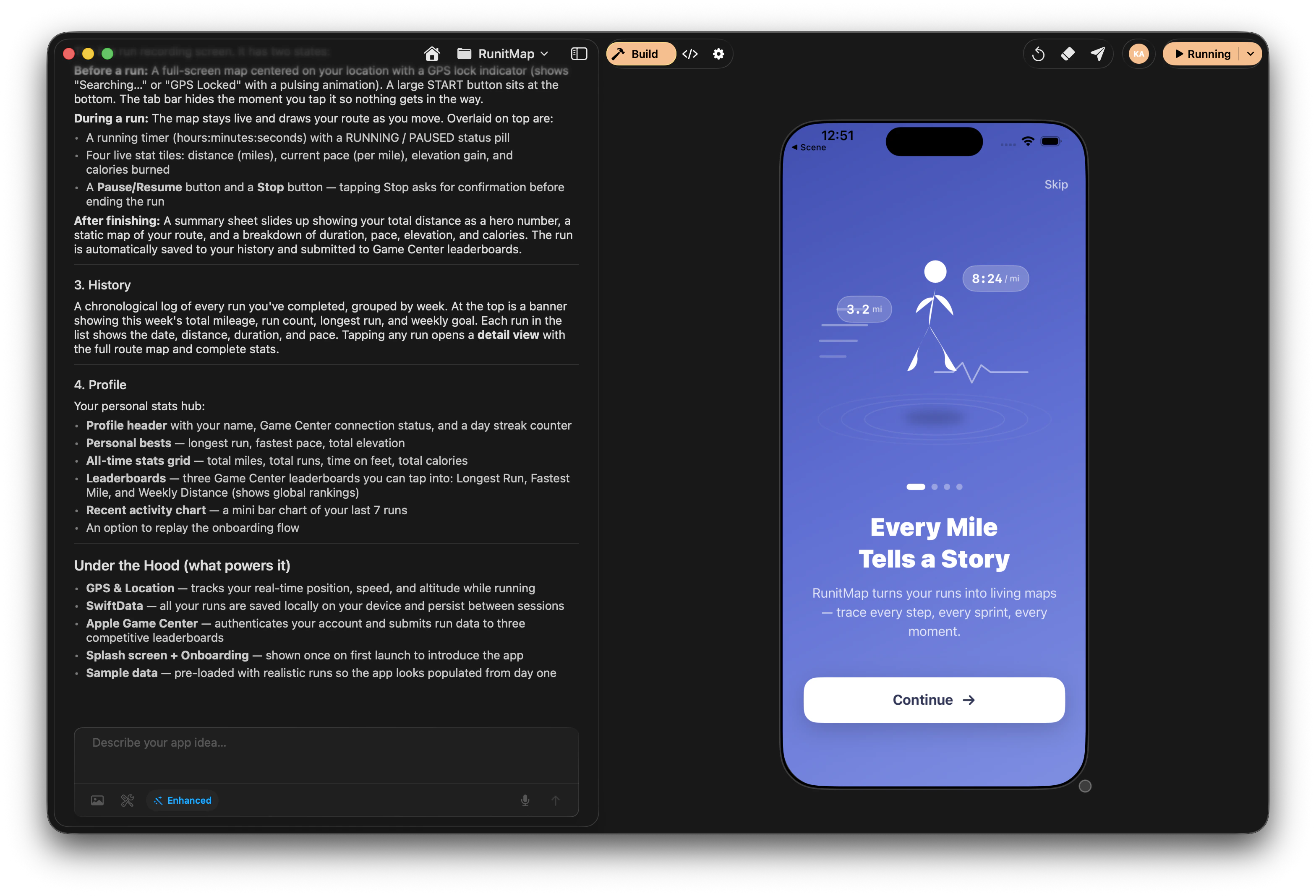
Nativeline is an AI-powered Mac app that turns your ideas into real, native applications for iPhone, iPad, and Mac. Just describe what you want, and watch it come to life.
 ## What You Can Build
Nativeline creates **real, native apps** — not prototypes or web wrappers. Your apps run natively on iPhones, iPads, and Macs with full access to platform features.
Todo lists, habit trackers, note-taking apps, journaling
Chat apps, community platforms, social networks
Calculators, converters, timers, menu bar utilities
Fitness trackers, meal planners, meditation apps
Recipe apps, travel guides, reference apps
Inventory management, CRM, booking systems
## How It Works
Tell the AI what you want to build in plain English. "Create a recipe app where I can save my favorite meals" is all you need. Choose your target platform — iPhone, iPad, or Mac.
Use the [Toolkit](/toolkit/overview) to drop in custom fonts, colors, images, sounds, data files, animations, and 3D models with simple # commands. No setup required.
Nativeline writes real Swift code, creates your UI, and handles all the technical complexity automatically. Choose from [four AI modes](/features/ai-modes) to match your needs.
Your app runs in the [embedded simulator](/features/embedded-simulator) right inside Nativeline. Mac apps run natively in a window. See changes in real-time as you iterate.
Ask for changes, add features, fix issues — the AI handles it all. Keep refining until it's perfect.
When you're ready, Nativeline helps you submit to TestFlight and the App Store. Mac apps can also be exported as DMG files.
## Why Nativeline?
### Real Native Apps
Unlike no-code builders that create web wrappers, Nativeline generates genuine Swift code using Apple's SwiftUI framework. Your apps are indistinguishable from those built by professional developers.
### Three Platforms, One App
Build for iPhone, iPad, or Mac — all from the same tool. Each platform gets native UI patterns: mobile layouts for iPhone, split views for iPad, and menu bars for Mac.
### Built-in Toolkit
Drop fonts, colors, sounds, data files, Lottie animations, videos, and 3D models directly into your app with [# commands](/toolkit/overview). No manual setup, no configuration files.
### Smart AI Modes
Four AI modes let you optimize for speed, design quality, or deep reasoning. [Enhanced mode](/features/ai-modes) delivers polished designs at low cost — it's the default for every project.
### No Coding Required
You never need to write code. The AI handles everything — from UI components to data storage to complex features. Just describe what you want.
### Full Control When You Want It
On Pro plans and above, access the full code editor. View, learn from, and even edit the Swift code yourself.
### From Idea to App Store
Nativeline covers the entire journey: building, testing, debugging, and publishing. Everything happens in one app.
## Who Is Nativeline For?
Turn your app idea into reality without hiring developers. Validate concepts quickly, iterate based on feedback, and launch to real users.
Build custom apps for your business — booking systems, inventory trackers, customer portals — without enterprise software costs.
Bring your designs to life. See your UI concepts become functional apps, then refine them visually until they're perfect.
Build apps for fun, for friends, or for learning. With Pro plans, see the code and learn Swift by doing.
Rapidly prototype ideas before investing engineering time. Get a working app in minutes instead of days.
## What Makes It Different
| Feature | Nativeline | No-Code Builders | Traditional Development |
| ---------------------- | --------------- | ---------------- | ----------------------- |
| Real native apps | ✅ Swift/SwiftUI | ❌ Web wrappers | ✅ |
| iPhone, iPad, & Mac | ✅ All three | Limited | ✅ |
| No coding needed | ✅ | ✅ | ❌ |
| Full code access | ✅ (Pro) | ❌ | ✅ |
| Built-in asset toolkit | ✅ | ❌ | ❌ |
| AI-powered | ✅ | ❌ | ❌ |
| App Store ready | ✅ | Limited | ✅ |
| Time to first app | Minutes | Hours | Days/Weeks |
## What You'll Need
Any Mac running macOS 15.1 (Sequoia) or later
Required for AI features and dependency downloads
That's it. Nativeline automatically installs everything else you need — Xcode, simulators, development tools — on first launch.
## Ready to Start?
Download and set up Nativeline in minutes
Build your first app in 10 minutes
Choose the right plan for your needs
Add fonts, colors, sounds, and more with # commands
## What You Can Build
Nativeline creates **real, native apps** — not prototypes or web wrappers. Your apps run natively on iPhones, iPads, and Macs with full access to platform features.
Todo lists, habit trackers, note-taking apps, journaling
Chat apps, community platforms, social networks
Calculators, converters, timers, menu bar utilities
Fitness trackers, meal planners, meditation apps
Recipe apps, travel guides, reference apps
Inventory management, CRM, booking systems
## How It Works
Tell the AI what you want to build in plain English. "Create a recipe app where I can save my favorite meals" is all you need. Choose your target platform — iPhone, iPad, or Mac.
Use the [Toolkit](/toolkit/overview) to drop in custom fonts, colors, images, sounds, data files, animations, and 3D models with simple # commands. No setup required.
Nativeline writes real Swift code, creates your UI, and handles all the technical complexity automatically. Choose from [four AI modes](/features/ai-modes) to match your needs.
Your app runs in the [embedded simulator](/features/embedded-simulator) right inside Nativeline. Mac apps run natively in a window. See changes in real-time as you iterate.
Ask for changes, add features, fix issues — the AI handles it all. Keep refining until it's perfect.
When you're ready, Nativeline helps you submit to TestFlight and the App Store. Mac apps can also be exported as DMG files.
## Why Nativeline?
### Real Native Apps
Unlike no-code builders that create web wrappers, Nativeline generates genuine Swift code using Apple's SwiftUI framework. Your apps are indistinguishable from those built by professional developers.
### Three Platforms, One App
Build for iPhone, iPad, or Mac — all from the same tool. Each platform gets native UI patterns: mobile layouts for iPhone, split views for iPad, and menu bars for Mac.
### Built-in Toolkit
Drop fonts, colors, sounds, data files, Lottie animations, videos, and 3D models directly into your app with [# commands](/toolkit/overview). No manual setup, no configuration files.
### Smart AI Modes
Four AI modes let you optimize for speed, design quality, or deep reasoning. [Enhanced mode](/features/ai-modes) delivers polished designs at low cost — it's the default for every project.
### No Coding Required
You never need to write code. The AI handles everything — from UI components to data storage to complex features. Just describe what you want.
### Full Control When You Want It
On Pro plans and above, access the full code editor. View, learn from, and even edit the Swift code yourself.
### From Idea to App Store
Nativeline covers the entire journey: building, testing, debugging, and publishing. Everything happens in one app.
## Who Is Nativeline For?
Turn your app idea into reality without hiring developers. Validate concepts quickly, iterate based on feedback, and launch to real users.
Build custom apps for your business — booking systems, inventory trackers, customer portals — without enterprise software costs.
Bring your designs to life. See your UI concepts become functional apps, then refine them visually until they're perfect.
Build apps for fun, for friends, or for learning. With Pro plans, see the code and learn Swift by doing.
Rapidly prototype ideas before investing engineering time. Get a working app in minutes instead of days.
## What Makes It Different
| Feature | Nativeline | No-Code Builders | Traditional Development |
| ---------------------- | --------------- | ---------------- | ----------------------- |
| Real native apps | ✅ Swift/SwiftUI | ❌ Web wrappers | ✅ |
| iPhone, iPad, & Mac | ✅ All three | Limited | ✅ |
| No coding needed | ✅ | ✅ | ❌ |
| Full code access | ✅ (Pro) | ❌ | ✅ |
| Built-in asset toolkit | ✅ | ❌ | ❌ |
| AI-powered | ✅ | ❌ | ❌ |
| App Store ready | ✅ | Limited | ✅ |
| Time to first app | Minutes | Hours | Days/Weeks |
## What You'll Need
Any Mac running macOS 15.1 (Sequoia) or later
Required for AI features and dependency downloads
That's it. Nativeline automatically installs everything else you need — Xcode, simulators, development tools — on first launch.
## Ready to Start?
Download and set up Nativeline in minutes
Build your first app in 10 minutes
Choose the right plan for your needs
Add fonts, colors, sounds, and more with # commands